
To maintain the professional integrity of the Simple Property Management brand and ensure compliance with USPS automated sorting, all staff must adhere to the following line-count and layout constraints.
1. Postcard Front: The "Single Line" Rule
The front of the postcard is designed for high-impact visibility. To prevent text overlapping or being cut off during high-res printing, the following sections must be kept to exactly one line of text each:
- Top Subtext: Professional credential or category.
- Main Title: The primary attention-grabbing headline.
- Bottom Text: The direct call-to-action or property detail.

Visual guide for the 1-line rule on the front of the card.
Mandatory Constraint
Do not attempt to force multiple lines of text into these areas. If the text wraps, it will fail the high-resolution pre-flight check.
2. Postcard Back: Address & Metadata
The back of the card contains technical areas that are reserved for USPS delivery data. Specifically, the address block, company URL, and phone number are "encased" within a protected zone.
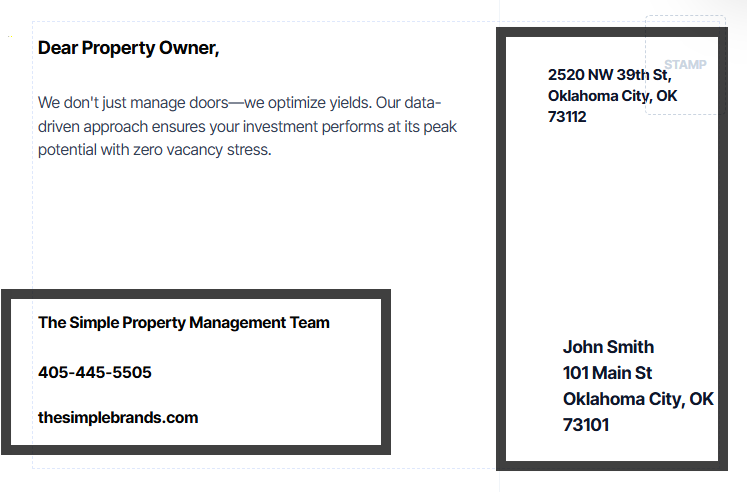
The encased address and company metadata zones.
Top Left Messaging: The message area on the top left must be kept to one single paragraph. Multiple paragraphs or excessive bullet points will interfere with the USPS postage permit area.
3. PostGrid Standardization
Once the campaign is sent to PostGrid, the address area will be automatically standardized to meet USPS Intelligent Mail Barcode (IMb) requirements. This ensures the fastest possible delivery to the property owner.
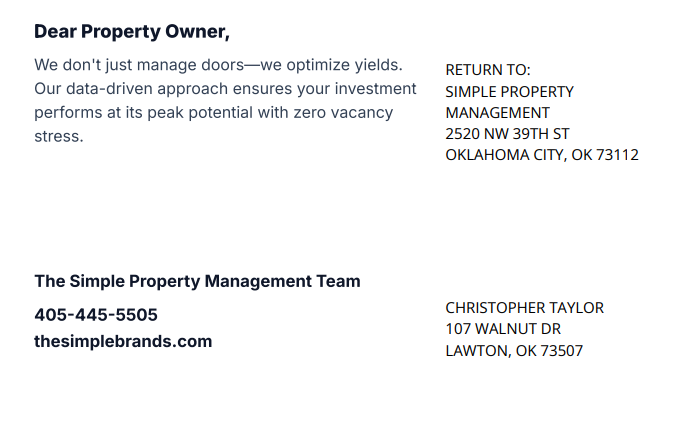
How the back of the card appears once fully standardized by PostGrid for mailing.
Best Practice
Always review the final preview in the "Campaign Basket" to ensure your 1-line and 1-paragraph constraints are met before clicking dispatch.
Automated Platform Enforcement
All technical USPS compliance settings (bleed, barcode spacing, safe zones, print resolution, and mailing specifications) are automatically enforced by the platform and cannot be modified.